
Unlock Hidden Features: A Power User’s Guide to Your Robotic Mower App

Your robotic mower’s companion app is far more than a remote control or a status screen—it’s the mission control center for your lawn. For most users, it remains a simple on/off switch, but buried within its menus lie powerful tools that can transform your mower from an automated cutter into an intelligent landscape management system. This guide reveals the pro-level settings and strategies that 90% of owners never discover.
If you own a premium robotic mower (like Goko, Husqvarna Automower® with Connect, or similar), you’ve already invested in advanced hardware. Yet, the true potential of that investment is unlocked not in your garage, but on your smartphone. Mastering these hidden features will elevate your lawn’s health, optimize your mower’s efficiency, and grant you a level of control and insight that borders on prescience.
Level 1: Mastering the Map & Zone Control
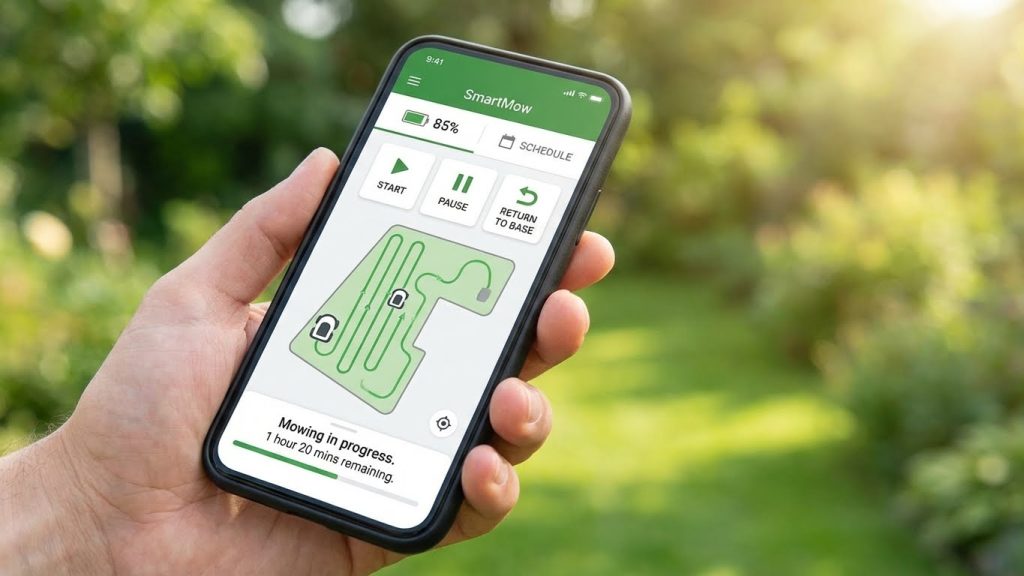
Your mower’s digital map is its brain. Most users see a simple outline; power users see a canvas for precision strategy.
The Hidden Power of Multi-Zone Strategies
-
Feature: Most apps allow you to split your lawn into multiple “Work Areas” or “Zones.” The hidden power lies in assigning unique “Lawn Types” or “Intensity Levels” to each.
-
Pro Application: Don’t just create zones by geography. Create them by function and biology.
-
“Showcase Front Zone”: Set to high-frequency mowing (every other day) with a lower cut height for a tight, manicured appearance.
-
“Backyard Family Zone”: Set to moderate frequency with a higher cut for durability. Enable “Child & Pet Safe” protocols (slower speed, enhanced obstacle detection).
-
“Slope & Shade Zone”: Set to lower frequency but longer runtimes. Adjust the “Terrain Power” setting (if available) to maximum for consistent traction on hills.
-
-
Benefit: This mimics professional groundskeeping, where different areas are managed differently for optimal health and purpose.
The “Virtual Fence” vs. “Keep-Out Zone” Nuance
-
Feature: You can define areas the mower should avoid. The advanced trick is understanding the difference between a hard “Keep-Out” (never enters) and a “Virtual Fence” (can trim along the edge but not cross).
-
Pro Application: Use “Keep-Out” for permanent hazards like a pond or delicate flower bed. Use a “Virtual Fence” along garden borders or gravel paths. This allows the mower to cut right to the edge without you needing to manually trim, while still preventing it from entering the forbidden area.
Level 2: Scheduling Beyond the Calendar
The basic scheduler is for days of the week. The power scheduler is for ecosystems.
Weather Intelligence Integration
-
Feature: Most apps connect to a weather service. The hidden feature is customizing the reaction rules.
-
Pro Application: Don’t just let it delay mowing for rain. Set it to:
-
Auto-resume based on soil dryness (e.g., resume 4 hours after a light rain, 8 hours after a heavy downpour).
-
Switch to “Heat Wave Mode” when temperatures exceed 90°F (32°C)—automatically mowing at dawn (5 AM) and raising the cut height by 10%.
-
Pause mowing when high winds are forecasted, which can blow grass clippings and affect navigation accuracy.
-
The “Adaptive Schedule” Toggle
-
Feature: This setting (often buried in “Advanced Settings”) lets the mower learn your lawn’s growth rate and adjust its schedule automatically.
-
Pro Application: Turn it ON in late spring during peak growth. The mower will increase frequency on its own. Turn it OFF in late summer or during drought, and lock in a less frequent, water-conserving schedule. This creates a truly “set-and-forget” system that responds to nature.
Level 3: Advanced Navigation & AI Settings
This is where your mower’s intelligence is fine-tuned.
Pathing Algorithm Selection
-
Feature: Some high-end models (e.g., with RTK/GPS) offer a choice: “Efficient Parallel Lines” or “Adaptive Full Coverage.”
-
Pro Application: Use “Parallel Lines” for large, open areas. It’s fast and creates a beautiful striped pattern. Switch to “Adaptive Coverage” for complex yards with many obstacles. It’s slightly slower but guarantees no missed spots. This setting can often be applied per zone.
AI Obstacle Sensitivity Sliders
-
Feature: Beyond a simple on/off switch, some apps have sliders for “Object Detection Sensitivity” and “Reaction Distance.”
-
Pro Application:
-
High Sensitivity / Long Distance: Perfect for yards with children, pets, or delicate garden art. The mower will detect and avoid from farther away.
-
Lower Sensitivity / Shorter Distance: For a clean, obstacle-free yard. This allows the mower to trim closer to fixed objects like tree trunks or lamp posts, reducing the need for follow-up edge trimming.
-
Level 4: Data Analytics & Health Diagnostics
Your app is a treasure trove of data. Most never open the reports tab.
The “Lawn Health” Inference Map
-
Feature: By analyzing motor load and cutting time per square meter, the mower can infer grass thickness and growth rate, generating a visual “Lawn Health” heatmap.
-
Pro Application: Use this map to identify trouble spots. A consistently “red” (high load) zone might indicate:
-
Soil compaction (needs aeration).
-
Poor grass type (consider overseeding).
-
Inadequate drainage.
This transforms your mower from a cutter into a diagnostic tool.
-
Battery & Component Health Dashboard
-
Feature: Deep in the system menu, you can find logs for battery cycle count, average charge/discharge curves, and motor performance metrics.
-
Pro Application: Monitor the “Battery Capacity Estimate” trend line. A sudden dip can indicate a cell issue. Track motor runtime hours to proactively schedule annual bearing checks before a failure occurs. This is predictive maintenance.
Level 5: System Integration & Automation
The ultimate power user move is making the mower talk to the rest of your smart home.
Creating IFTTT or Home Assistant Automations
-
Feature: Using the mower’s open API (if available) or services like IFTTT.
-
Pro Application:
-
“Goodnight” Scene: When you lock your smart lock at night, it checks if the mower is docked. If not, it sends an alert.
-
Security Integration: When your security cameras detect no one is home for 30 minutes, the mower receives the “all clear” to start working in the backyard.
-
Irrigation Handshake: Create a rule: “Do not mow Zone B for 6 hours after the smart sprinklers have watered Zone B.”
-
Multi-Mower Fleet Management
-
Feature: For estates large enough for two mowers, the app can coordinate them as a fleet.
-
Pro Application: Set up a primary/secondary hierarchy. The primary mower handles scheduling and no-go zones, while the secondary mower is assigned specific zones or acts as a backup. They can even be set to avoid each other in real-time.
The Power User Mindset: From Operator to Strategist
Adopting these features requires a shift in perspective. You are no longer just a homeowner who owns a robot. You are a Lawn Data Analyst, a Systems Integrator, and a Predictive Maintenance Manager.
Start Small: Pick one feature from Level 1 or 2 this week—like refining your zones. Next month, dive into the data analytics. By the end of the season, experiment with a smart home automation.
The reward is profound. You move from wondering “Is the mower done?” to knowing not only that it’s done, but exactly how it performed, what your lawn needs next, and having the confidence that the entire process is tuned to perfection. This is the true promise of smart lawn care: not just automation, but intelligent, data-driven stewardship. Unlock these features, and you’ll never look at your lawn—or your app—the same way again.