

The dreaded “Offline” status on your robotic mower app isn’t just an inconvenience—it’s a breakdown in the intelligent system you invested in. For American homeowners, this often means losing remote control, schedule updates, and crucial performance data. While a simple reboot might offer a temporary fix, permanent resolution requires understanding that Wi-Fi and GPS are two distinct systems with unique failure points, each demanding a targeted strategy.
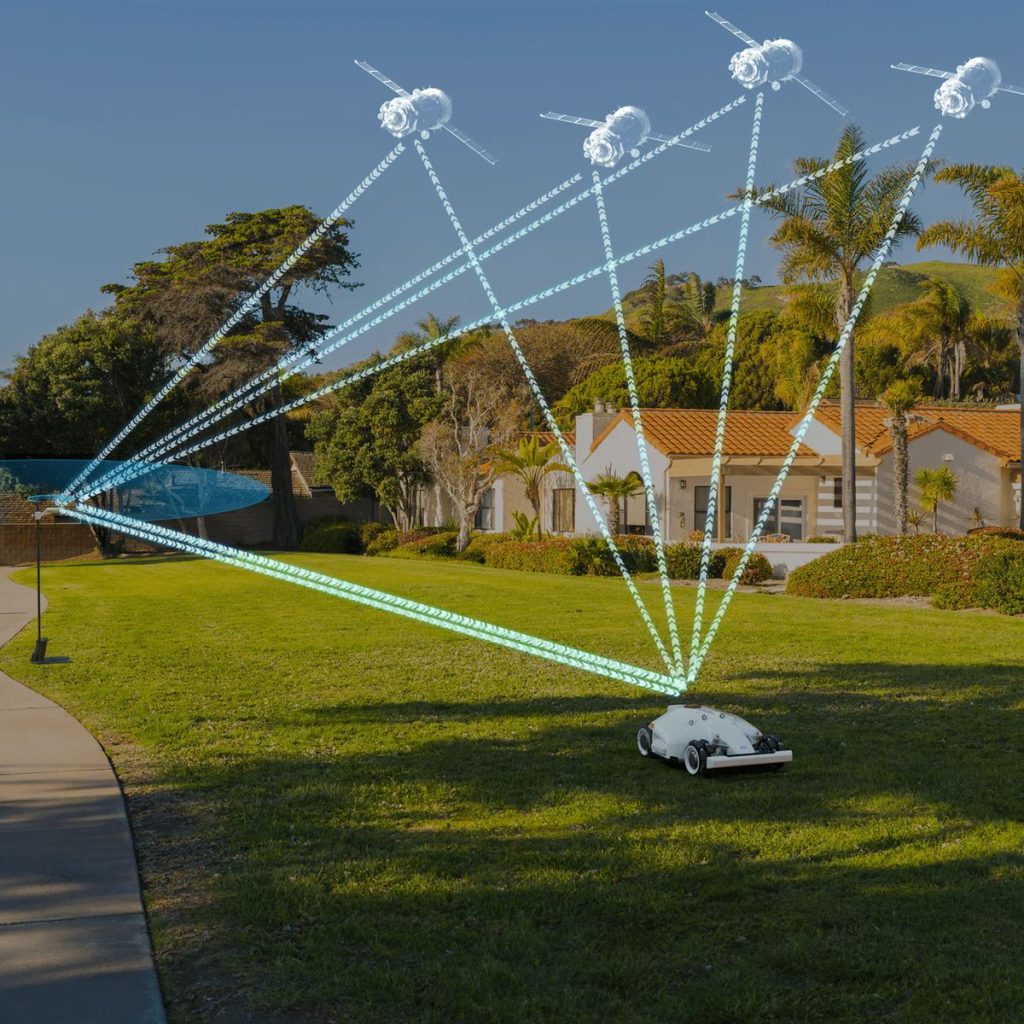
Your robotic mower operates on two critical wireless links: Wi-Fi is its “remote control and reporting line” to your phone and the cloud, while GPS (or RTK) is its “internal map and compass.” Failure in either cripples its smart functionality. This guide provides a systematic, professional approach to diagnosing, fixing, and ultimately designing your property’s infrastructure to prevent these disconnections for good.
Phase 1: Systematic Diagnosis – Identifying the True Culprit
First, determine which system has failed. The symptoms are distinct:
-
Wi-Fi Failure Symptoms:
-
App shows “Offline” or “Disconnected.”
-
You cannot send commands (start, stop, go home).
-
But, the mower may continue mowing on its last known schedule and successfully return to its dock.
-
You receive no notifications or status updates.
-
-
GPS/Navigation Signal Failure Symptoms:
-
App may show “Positioning Lost,” “Signal Weak,” or “Outside Work Area.”
-
The mower is stopped and beeping/displaying a warning light.
-
It cannot navigate, often circling erratically or stranded in place.
-
The map view in your app is frozen or shows the mower in the wrong location.
-
Action: Open your app. Is the mower shown as offline but reportedly moving? That’s Wi-Fi. Is it stopped with a positioning error? That’s GPS.
Phase 2: The Permanent Wi-Fi Fix Protocol
A stable Wi-Fi connection requires three elements: a strong signal at the dock, correct credentials, and a compatible network setup.
Step 1: The Infrastructure Audit (The Most Important Step)
The dock is often in a garage or shed—a Wi-Fi dead zone.
-
The Smartphone Test: Place your phone where the docking station is. Run a speed test. If you get less than 2-3 bars of signal, your router’s signal is too weak.
-
Permanent Solutions:
-
Wi-Fi Mesh Network (Recommended): Systems like Google Nest Wifi or Eero use multiple units to blanket your property in a single, strong network. Place one satellite node in your garage or near the dock.
-
Powerline Ethernet Adapter + Access Point: For detached buildings, use a powerline adapter to send internet through your electrical wiring, then connect a simple access point in the shed.
-
Router Repositioning: Sometimes, simply elevating your main router and ensuring it’s not buried in a cabinet can work wonders.
-
Step 2: The Network Configuration Check
Robotic mowers often struggle with certain modern network settings.
-
Disable “Client Isolation” or “AP Isolation”: This feature, common on guest networks, prevents devices on the same Wi-Fi from talking to each other. Your phone and mower need to communicate. Connect the mower to your primary, trusted network.
-
Assign a Static IP (Advanced): In your router’s admin settings, assign a permanent IP address to your mower based on its MAC address. This prevents occasional conflicts that can cause drop-offs.
-
Check 2.4 GHz vs. 5 GHz: Most mowers only connect to 2.4 GHz networks. Ensure your router is broadcasting a 2.4 GHz band and that the mower is connected to it. 5 GHz has shorter range and poorer wall penetration.
Step 3: The Mower & App Re-authentication
-
In your app, forget the mower’s Wi-Fi network and re-enter the credentials. Typos are common.
-
Reboot your home router. A simple power cycle clears countless transient glitches.
-
Ensure your mower’s firmware is up to date. Updates often include improved Wi-Fi stability patches.
Phase 3: The Permanent GPS/Navigation Signal Fix Protocol
GPS signals are line-of-sight from space. RTK systems add a local base station for precision, which adds another link in the chain.
For Standard GPS/GLONASS Models:
-
The Clear Sky Audit: GPS signals cannot penetrate solid objects. Is the dock under a thick tree canopy, a metal roof, or tucked deep against the side of your house? The mower needs a clear-ish view of the sky to get an initial “fix.” Reposition the dock to a more open location if possible.
-
Interference Check: Large metal structures, solar panels, or even dense foliage during wet conditions can attenuate signals.
For Advanced RTK (Real-Time Kinematic) Systems:
This is the professional solution for precision navigation and is what high-end brands like Goko use. It involves a fixed base station and the mower.
-
Base Station Placement is Key: The RTK base station MUST have a permanent, unobstructed 360-degree view of the sky. Mount it on a roof peak, a tall pole in your yard, or the highest point of your garage. This is non-negotiable.
-
Power & Connection: Ensure the base station has uninterrupted power and a stable Ethernet connection to your router. A Wi-Fi connection to the base is less reliable.
-
Re-Sync the System: Use the app to force a re-sync between the mower and the base station. This re-establishes their communication link.
Phase 4: The Proactive Monitoring & Prevention System
Don’t wait for a failure. Build resilience.
-
Create a Wi-Fi Health Dashboard: Use a free app like WiFi Analyzer to visually map the signal strength across your property. Identify and eliminate dead zones before they affect your mower.
-
Leverage Smart Home Tech: Plug your mower’s docking station or router into a smart plug. If you get an offline alert, you can remotely power cycle it from your phone, often solving the issue instantly.
-
Establish a “Signal Quality Baseline”: In your mower’s app, note the reported GPS satellite count or Wi-Fi signal strength when everything is working perfectly. This becomes your reference point for future diagnostics.
When the Problem Isn’t Yours: External Factors
Sometimes, the issue is out of your control:
-
GPS “Outages”: Solar flares or military testing can temporarily degrade GPS accuracy across wide areas. Check sites like the U.S. GPS Service Status.
-
Internet Service Provider (ISP) Outages: If your entire home internet is down, Wi-Fi connectivity will fail.
Conclusion: From Reactive Fixing to Proactive Network Design
Solving “offline” problems permanently requires a shift in mindset. You are no longer just a lawn owner, but a home network manager and a signal environment architect.
The goal is to engineer your property’s infrastructure to support the advanced technology you’ve purchased. This means investing in a robust Wi-Fi mesh system, strategically placing the RTK base station like a vital antenna, and understanding the configuration of your home network.
By implementing this structured approach, you move from repeatedly rebooting a frustrating device to managing a reliable, always-connected landscape system. The peace of mind that comes from a consistently “online” mower—where you can check its status, adjust its schedule on a whim, and receive proactive alerts from anywhere—is the true realization of smart lawn care’s promise. Stop chasing symptoms. Build a foundation that works, for good.